Skip to content
IM Quality Compliance

IM Quality Compliance

Help & FAQs

IM Quality Compliance
Help & FAQs

Getting Started

  • IM Quality Compliance

Setup

  • Setup

Features

  • Menu
  • Incident Management – Purchases
  • Incident Management – Sales

Support

  • Support

FAQs

  • FAQs
View Categories
  • Home
  • IM Quality Compliance
  • Setup

Setup

1 min read

SETUP MENU

Select the Setup option from the IM Quality Compliance Menu

SETUP OPTIONS
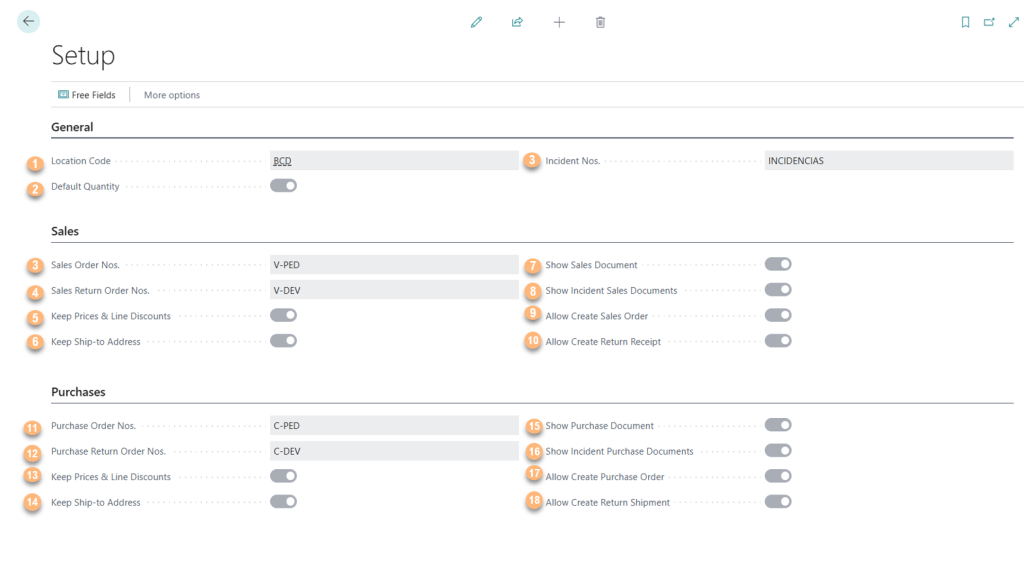
  1. Location Code: Default location code used for incidents.
  2. Default Quantity: Predefined quantity for incident-related documents.
  3. Incident Nos.: Serial number format for incident records.
  4. Sales Order Nos.: Serial number format for sales orders created from incidents.
  5. Keep Prices and Line Discounts (Sales): Indicates whether the original prices and line discounts from the order, delivery note, or sales invoice should be retained in the incident.
  6. Keep Ship-to Address (Sales): Indicates whether the shipping address from the original sales document should be retained in the incident.
  7. Show Sales Documents: Indicates whether to display the sales documents generated from incidents.
  8. Show Incidents Sales Documents: Indicates whether to display linked incidents when creating new sales documents.
  9. Allow Create Sales Orders: Enables the creation of sales orders directly from the Incident Card.
  10. Allow Create Return Receipts: Enables the creation of return receipts directly from the Incident Card.
  11. Purchase Order Nos.: Serial number format for purchase orders.
  12. Purchase Return Order Nos.: Serial number format for purchase return orders.
  13. Keep Prices and Line Discounts (Purchasing): Retains the original prices and line discounts from the source document.
  14. Keep Ship-to Address (Purchasing): Retains the ship-to address from the original purchasing document.
  15. Show Purchase Documents: Indicates whether to display the purchase documents generated from incidents.
  16. Show Incident Purchase Documents: Allows displaying incident numbers in purchasing documents for improved traceability.
  17. Allow Create Purchase Orders: Enables the creation of purchase orders directly from the Incident Card.
  18. Allow Create Return Shipments: Enables the creation of return shipments directly from the Incident Card.

FREE FIELDS

Free fields can be created to tailor the tool to the specific needs of the company.

Updated on December 1, 2025
Table of contents
  • SETUP MENU
  • SETUP OPTIONS
  • FREE FIELDS

Contact Us

  • info@im-projects.com
  • www.im-projects.com

Explore

  • IM Quality Compliance
  • Setup
  • Features

Help

  • FAQs
  • Support

Legal

  • Terms
  • Privacy
  • Cookies

© 2026 IM Projects  |  Web Design: Dolphin Tecnologías

We use cookies on our website to give you the most relevant experience by remembering your preferences and repeat visits. By clicking “Accept”, you consent to the use of ALL the cookies.
Cookie settingsACCEPT
Manage consent

Privacy Overview

This website uses cookies to improve your experience while you navigate through the website. Out of these, the cookies that are categorized as necessary are stored on your browser as they are essential for the working of basic functionalities of the website. We also use third-party cookies that help us analyze and understand how you use this website. These cookies will be stored in your browser only with your consent. You also have the option to opt-out of these cookies. But opting out of some of these cookies may affect your browsing experience.
Necessary
Always Enabled
Necessary cookies are absolutely essential for the website to function properly. These cookies ensure basic functionalities and security features of the website, anonymously.
CookieDurationDescription
cookielawinfo-checbox-analytics11 monthsThis cookie is set by GDPR Cookie Consent plugin. The cookie is used to store the user consent for the cookies in the category "Analytics".
cookielawinfo-checbox-functional11 monthsThe cookie is set by GDPR cookie consent to record the user consent for the cookies in the category "Functional".
cookielawinfo-checbox-others11 monthsThis cookie is set by GDPR Cookie Consent plugin. The cookie is used to store the user consent for the cookies in the category "Other.
cookielawinfo-checkbox-necessary11 monthsThis cookie is set by GDPR Cookie Consent plugin. The cookies is used to store the user consent for the cookies in the category "Necessary".
cookielawinfo-checkbox-performance11 monthsThis cookie is set by GDPR Cookie Consent plugin. The cookie is used to store the user consent for the cookies in the category "Performance".
viewed_cookie_policy11 monthsThe cookie is set by the GDPR Cookie Consent plugin and is used to store whether or not user has consented to the use of cookies. It does not store any personal data.
Functional
Functional cookies help to perform certain functionalities like sharing the content of the website on social media platforms, collect feedbacks, and other third-party features.
Performance
Performance cookies are used to understand and analyze the key performance indexes of the website which helps in delivering a better user experience for the visitors.
Analytics
Analytical cookies are used to understand how visitors interact with the website. These cookies help provide information on metrics the number of visitors, bounce rate, traffic source, etc.
Advertisement
Advertisement cookies are used to provide visitors with relevant ads and marketing campaigns. These cookies track visitors across websites and collect information to provide customized ads.
Others
Other uncategorized cookies are those that are being analyzed and have not been classified into a category as yet.
SAVE & ACCEPT
Scroll to top